




Small Retailer


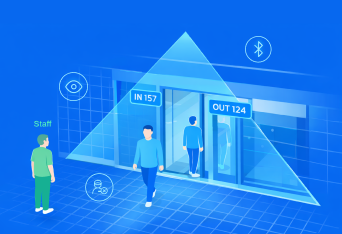









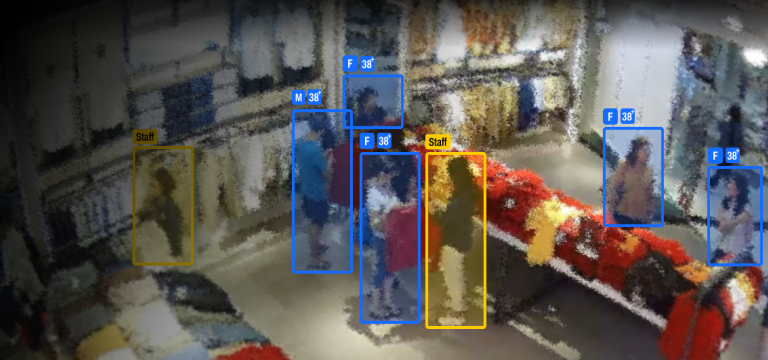
“A built-in feature that automatically filters out staff movements from your visitor counts”
Using advanced vision intelligence, the system understands typical staff behaviour - such as standing behind the counter, helping customers, or restocking shelves, and automatically excludes these movements from the visitor count. There’s no need for extra hardware, no badges to wear, and no manual settings to update. It just works quietly in the background to keep your data accurate.
The system is built around four design principles:
Why past methods didn’t work
Before AI-based recognition, the industry tried many different techniques. Each had practical limitations:
|
Previous Method |
Why It Didn’t Work in Real Life |
|
Staff Button |
Depends on staff remembering to press it; inconsistent and unreliable. |
|
Staff Exclusion Line |
Only works if staff always walk through a specific path; easy to bypass unintentionally. |
|
Printed Badge / Tag on Chest |
Requires consistent wearing; obstructed easily; visibility depends on camera angle. |
|
Reflective Patches on Shoulders |
Works only under ideal lighting and camera angles; not suitable for varied uniforms. |
|
Bluetooth Beacons |
Requires battery, pairing, and maintenance; signal often unstable; not universally accepted. |
Our Approach
The system uses visual cues and movement patterns to recognise staff automatically.
Examples include:
- Distinctive uniform colours or shapes (if available)
- Standing behind counters or operating in staff-only zones
- Serving customers for extended periods
- Repeated movement paths within the store
This does not require staff to wear anything or press anything. It works entirely in the background.
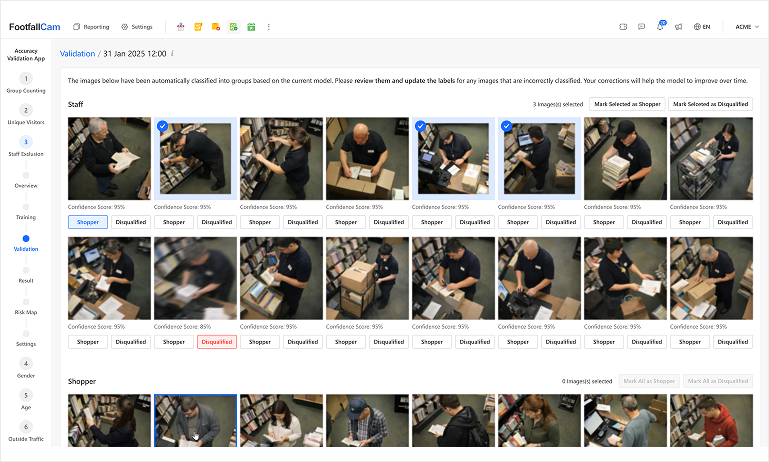
Validation Workspace
There is a built-in workspace that allows you to:
- Review thumbnails of detected staff and non-staff
- Confirm or correct the system’s understanding
- Train the environment once, and let it adapt over time
The system refines itself within minutes using these inputs. This ensures the results remain accurate as staff behaviour changes.
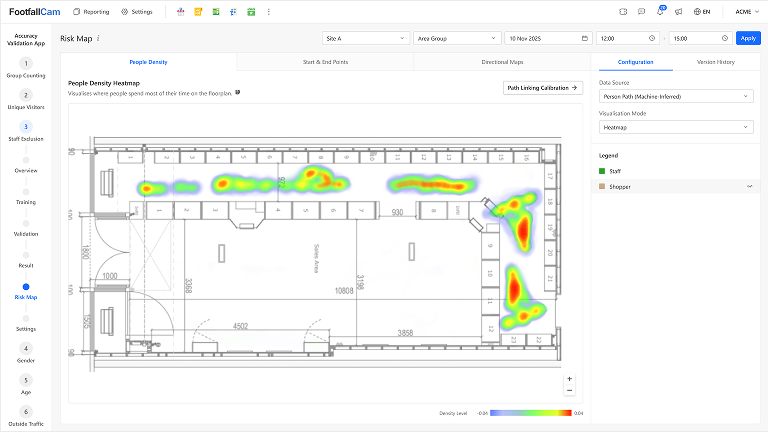
Risk Map
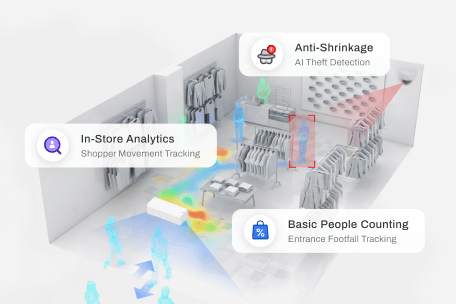
The system automatically builds a risk map, showing:
- Where staff usually walk
- Where customers typically move
- Where uncertainties still exist
This helps you understand how the system makes decisions and where adjustments may be needed.
What You Can Expect
- No extra hardware
- No badges or tags
- No staff training required
- Works with existing cameras
- Improves accuracy over time
- Suitable for most retail environments
Small or highly constrained entrances may require additional camera coverage for best results.
Case Study
Luxury Boutique
Jewellery Store
Electronics Store
Cosmetics Retailer
Home Furnishing Store
Luxury Boutique
Case Study 1
Luxury Boutique – No Uniform, No Problem
Before
A luxury fashion boutique had no staff uniforms, making it impossible to distinguish staff from customers. Staff often moved around the shop floor helping VIP clients, and their movements inflated the customer counts significantly.
After
With Pro2 (2026) covering the entrance and the in-store cameras mapping movement patterns, the system learnt staff behaviour within minutes, who usually stands at the fitting rooms, who stays behind the counter, and who accompanies customers for long periods.
Outcome
The boutique finally obtained clean customer counts without changing staff dress codes.
Website takeaway
Perfect for luxury boutiques with no uniforms — the system recognises staff by behaviour, not clothing.
Jewellery Store
Case Study 2
Middle Eastern Jewellery Store – Similar Clothing for Everyone
Before
In a Middle Eastern jewellery store, both staff and customers frequently wore similar black or white attire. Traditional colour-based methods were ineffective, and manual tagging wasn’t practical.
After
The AI used travel paths and dwell zones, especially behind the consultation counters and display cases, to distinguish staff from customers. Heat maps showed clear staff-only zones, making exclusions accurate even when attire looked identical.
Outcome
The store gained reliable traffic data for the first time without any operational changes.
Website takeaway
Works even when staff and customers dress similarly, behaviour and position provide the clarity.
Electronics Store
Case Study 3
High-Street Electronics Store – Large Floor Area, Constant Movement
Before
The store struggled because staff moved constantly across the shop to assist customers, making them appear as new visitors each time they passed an entrance camera.
After
Thanks to the extended coverage of Pro2 (2026) and multiple interior cameras, the system tracked movement patterns across the entire shop floor. Staff who patrolled zones or repeatedly crossed the same aisles were automatically identified and excluded.
Outcome
Footfall accuracy improved instantly, and the store finally had reliable conversion rates.
Website takeaway
Ideal for busy stores where staff are always on the move — consistent behaviour patterns make staff easy to exclude.
Cosmetics Retailer
Case Study 4
Premium Cosmetics Retailer – Small Store, High Staff Engagement
Before
Staff frequently stood outside the storefront to welcome walk-in customers or demonstrate products. Because staff stood within the camera’s field of view, counts were heavily inflated.
After
With both entrance and in-store cameras contributing to the risk map, the system identified these recurring dwell spots as “staff zones”. Staff were excluded automatically even when they stood in customer-facing positions.
Outcome
The retailer could finally compare true walk-in traffic against sales and campaign performance.
Website takeaway
Great for beauty and cosmetics stores where staff engage customers in prominent areas.
Home Furnishing Store
Case Study 5
Home Furnishing Store – External Contractors and Mixed Roles
Before
The store frequently had stock replenishment contractors, interior stylists, and part-time staff entering and exiting the floor. This made it difficult to maintain consistent visitor numbers because the system couldn’t tell who was staff and who wasn’t.
After
The staff exclusion engine built a risk map showing high-frequency staff movement and shelf-restocking behaviour. Even new contractors were recognised by their dwell patterns and repeated presence in staff-only zones.
Outcome
The store gained stable traffic data without needing badges or manual tagging for contractors.
Website takeaway
Reliable for stores with mixed teams and contractors — repeated behaviour reveals who is staff.
FAQs
Learn More